Architecture
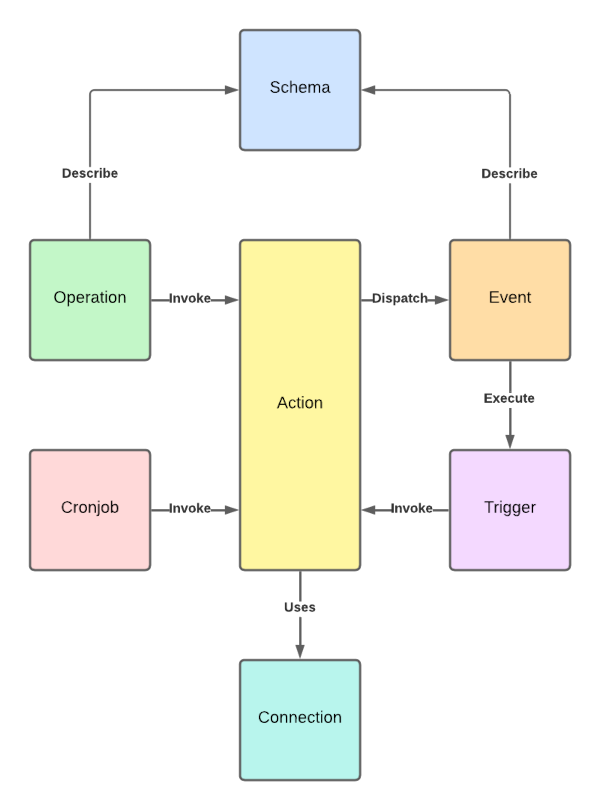
This page gives you a high-level overview of how Fusio works. Fusio is built around seven core entities. Once you understand them and how they work together, you understand how every API in Fusio is built.
Overview
At the center of Fusio is the action, it contains the business logic. All other entities either invoke an action, describe its data or provide it access to external services:
| Entity | Role | In one sentence |
|---|---|---|
| Operation | Invokes an action | An endpoint of your API, i.e. GET /contracts, which invokes an action when called |
| Cronjob | Invokes an action | Invokes an action at a fixed interval, i.e. every night at 2am |
| Trigger | Invokes an action | Invokes an action every time a specific event is dispatched |
| Action | Business logic | Contains the logic which is executed, comparable to a serverless function |
| Connection | Access to services | Provides an action access to external services like a database or a remote API |
| Schema | Describes data | Describes the structure of JSON data, i.e. the request and response of an operation |
| Event | Notifies others | Something that happened at your API, i.e. contract_created, which others can react to |
As you can see at the diagram, an action can be invoked in three ways: by a client calling an operation, by time through a cronjob or by an event through a trigger. This means you can reuse the same action for an API endpoint, a scheduled job and an event handler.
Operation
An operation is the public interface of your API. It is bound to an HTTP method and path, i.e. GET /contracts/:id,
and defines which action is invoked when a client calls this endpoint. Besides the HTTP route, an operation also
contains everything a client needs to know about the endpoint:
- The schemas of the query parameters, the request body and the response
- Whether the operation is public or requires an access token with a specific scope
- A description and stability which are shown at the documentation
Through this information Fusio validates incoming requests and generates the OpenAPI specification and client SDKs of your API automatically. Besides HTTP, operations can also be invoked through MCP, JSON-RPC or GraphQL.
Learn more at the Operation page.
Action
An action contains the actual business logic of your API. It receives a request and produces a response, similar to a serverless function. Since the action is decoupled from the HTTP layer, it does not matter whether it was invoked by an operation, a cronjob or a trigger.
You have two options to create an action:
- Use a prebuilt action: Fusio contains many ready-to-use actions, i.e. to proxy a request to a remote API, to execute a SQL query or to send a mail. They are configured at the backend, without writing any code
- Build your own action: Write custom logic in PHP or through a worker also in JavaScript, Python or Java
Connection
A connection provides an action access to an external service, i.e. a database, a message queue or a remote API. You configure the credentials of a connection once at the backend and every action can use it by name. This means credentials are never part of your business logic and you can i.e. switch from a test to a production database without changing any action.
A connection always returns a fully configured client of a well-known library, i.e. the SQL connection returns a Doctrine DBAL connection and the HTTP connection a Guzzle client. For services like Stripe or AWS the connection returns the official SDK. Inside your action you can then use the API of the library which you already know:
$connection = $connector->getConnection('My-Database');
$rows = $connection->fetchAllAssociative('SELECT * FROM app_contract');
Learn more at the Connection page.
Schema
A schema describes the structure of JSON data. Fusio uses schemas to describe the request and response of an operation and the payload of an event. Schemas are based on TypeSchema.
Schemas are optional, but they are the contract between you and the consumers of your API. Based on your schemas Fusio can:
- Validate incoming request data
- Generate an OpenAPI specification and documentation
- Generate type-safe client SDKs for your API
Learn more at the Schema page.
Event
An event represents something that happened at your API, i.e. contract_created. Your action dispatches the event
together with a payload, which can be described by a schema:
$dispatcher->dispatch('contract_created', $contract);
Events decouple your API from the parts which react to it. There are two ways to react to an event:
- External: Consumers of your API can register a webhook for an event, Fusio then sends an HTTP POST request with the payload to their URL
- Internal: You can create a trigger which invokes an action at your Fusio instance
The delivery happens in the background, so dispatching an event does not slow down your API.
Learn more at the Event page.
Trigger
A trigger connects an event with an action. Every time the event is dispatched, Fusio invokes the action of the
trigger with the event payload. Through this you can build internal workflows, i.e. send a welcome mail every time
a user_registered event was dispatched, without adding this logic to the action which registers the user.
Learn more at the Trigger page.
Cronjob
A cronjob invokes an action at a periodical interval, which is defined by a standard
cron expression, i.e. 0 2 * * * for every night at 2am. Typical use cases are
cleanup tasks, sending reports or synchronizing data with external systems.
Learn more at the Cronjob page.
Putting it all together
The following example shows how the entities work together in a contract management API:
- A client sends a
POST /contractsrequest to the operationcontract.create - Fusio validates the request body against the
Contractschema and checks the access token of the client - The operation invokes the
Contract-Createaction, which uses theMy-Databaseconnection to insert the contract into the database - The action dispatches the
contract_createdevent - Fusio sends the event to all registered webhooks of your consumers, and a trigger invokes the
Send-Confirmation-Mailaction - Every night a cronjob invokes the
Contract-Cleanupaction, which removes expired contracts
Every step is configured at the backend, and the business logic stays small and focused within the actions.
Next steps
- Getting started - Build your first API endpoint
- Operation - Learn how to design operations
- Action - Learn how to write your own business logic