Operation
An operation is an endpoint of your API. It is bound to an HTTP method and path, i.e. POST /answers/:answerId/vote,
and invokes an action which contains the business logic. Besides the route, an operation describes
everything a client needs to know about the endpoint: which parameters it accepts, which data it expects and returns,
and who is allowed to call it.
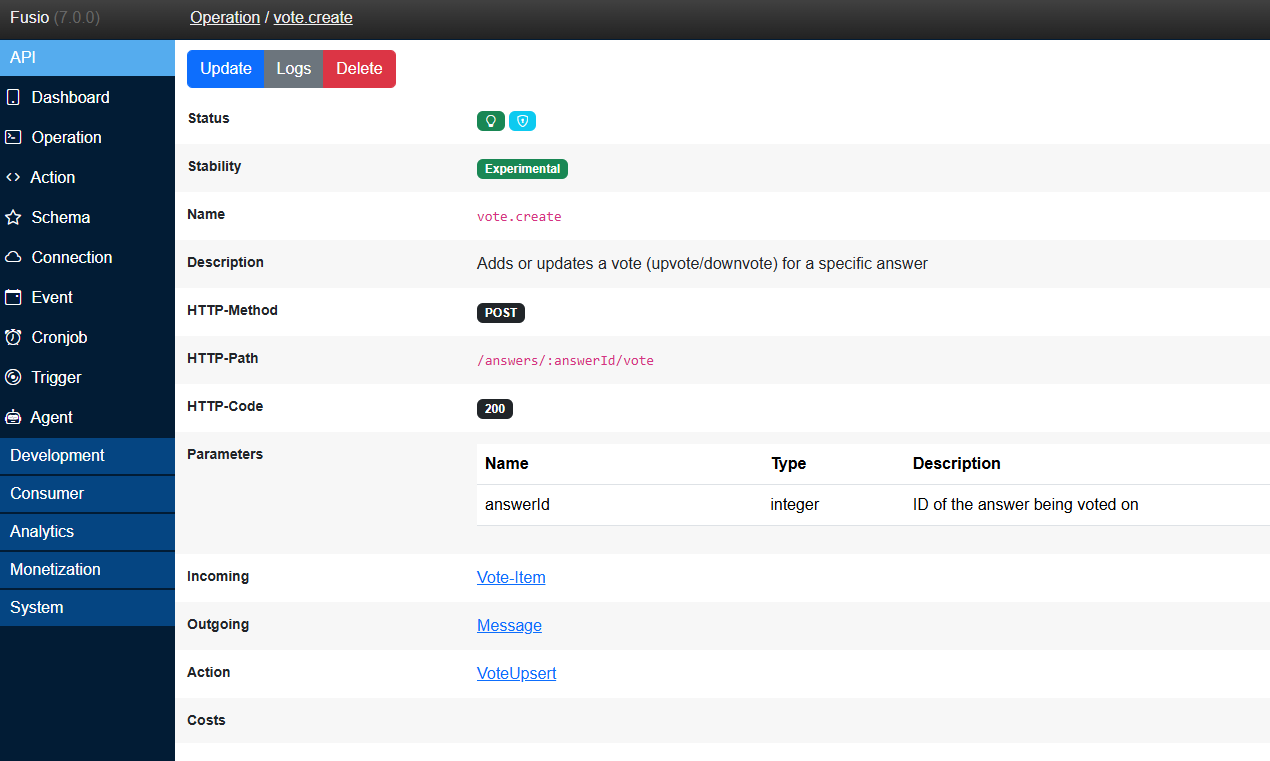
What an operation defines
You can think of an operation as a contract between your API and its clients. Every operation defines:
| Part | Description |
|---|---|
| Route | The HTTP method and path, i.e. GET /contracts/:id, and the HTTP status code of a success response |
| Parameters | The query parameters which the endpoint accepts, i.e. ?startIndex=0&count=16 |
| Incoming | The schema of the request body |
| Outgoing | The schema of the success response |
| Throws | The schemas of the error responses, i.e. for 404 or 500 |
| Action | The business logic which is executed |
| Access | Whether the operation is public or requires an access token with specific scopes |
| Stability | The lifecycle state, i.e. Experimental or Stable |
| Costs | Optional points which a user pays for every call, if you monetize your API |
Because all this information is part of the operation, Fusio can validate incoming requests, and generate an OpenAPI specification, documentation and type-safe client SDKs for your API automatically.
All settings are explained in detail at the Configuration page.
What happens when an operation is called
When a client sends a request to your API, Fusio processes it through the following steps before your action is executed. If a step fails, Fusio directly returns an error response and your action is not invoked:
| Step | Description | Error response |
|---|---|---|
| 1. Routing | Fusio finds the operation which matches the HTTP method and path | 404 Not Found |
| 2. Firewall | Fusio checks whether the IP of the client is blocked by the firewall, i.e. because it has caused too many client errors | 403 Forbidden |
| 3. Authentication | For private operations Fusio checks the access token and whether it contains a scope of the operation | 401 Unauthorized |
| 4. Rate limit | Fusio checks whether the client has exceeded its rate limit | 429 Too Many Requests |
| 5. Active | Fusio checks whether the operation is active | 410 Gone |
| 6. Costs | If the operation has costs, Fusio checks whether the user has enough points and deducts them | 402 Payment Required |
| 7. Action | Fusio invokes the action and returns its response with the configured HTTP status code | depends on the action |
Every request is logged, so you can inspect it later at the backend under Analytics / Log. Fusio also adds the following headers to every response:
| Header | Description |
|---|---|
X-Request-Id | A unique id of the request, useful i.e. to find the request at the logs |
X-Operation-Id | The name of the operation which was invoked |
X-Stability | The stability of the operation, i.e. experimental or stable |
Not only HTTP
Every operation is also available through other protocols, without any additional configuration. This means a client can invoke the same operation, with the same validation, authentication and business logic, through:
- MCP - So that AI tools and agents can use your API
- JSON-RPC - To call operations as remote procedures
- GraphQL - To query your API through GraphQL
- AI Agent - To use your API as a tool of an AI agent
Topics
- Configuration - All settings of an operation explained in detail
- Invoke a private operation - How clients obtain an access token to call protected operations
- Versioning - How to evolve your API without breaking existing clients