Configuration
This page explains all settings of an operation. You can configure an operation at the backend under API / Operation or through the deployment system.
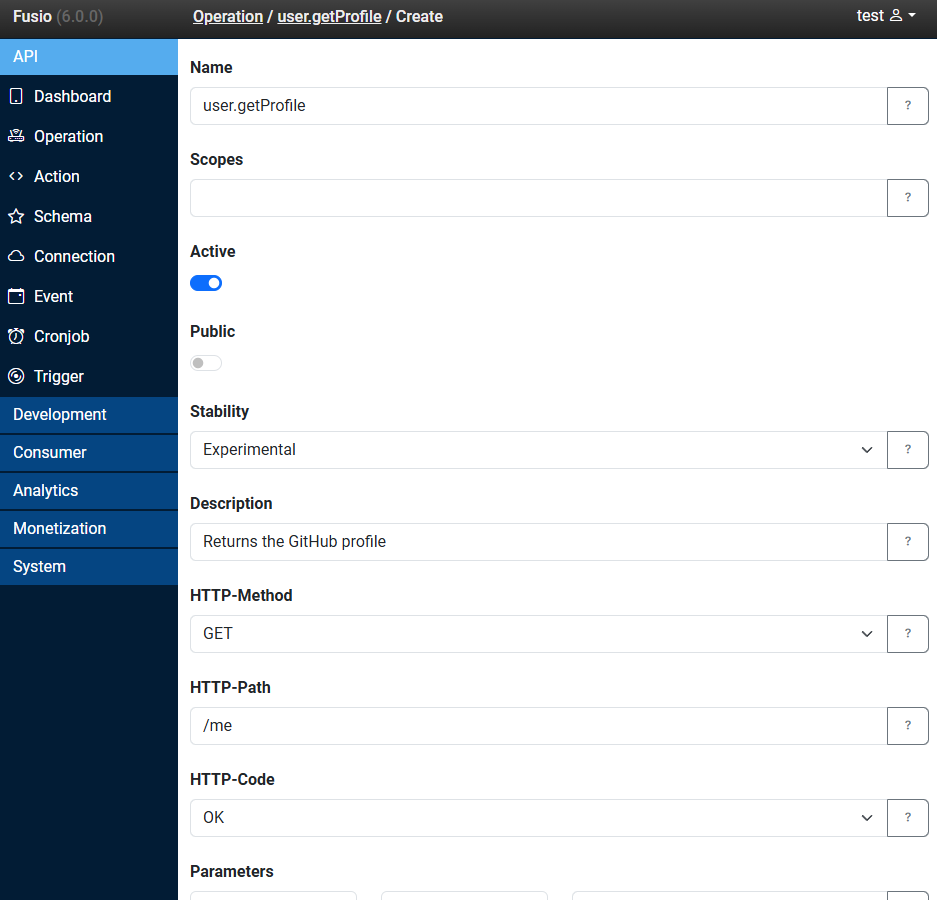
Name
The name identifies the operation, i.e. at the logs or the generated SDK. We recommend to group your operations
with dots into namespaces, i.e. contract.getAll, contract.get or contract.create. The generated client SDK
reflects this structure, i.e. client.contract().getAll().
Description
A short description of what the operation does. It is shown at the generated documentation and SDK, and is also used by AI tools when your API is used through MCP, so a clear description helps every consumer of your API.
HTTP method
The HTTP method of the operation. Use the method which fits the intent of your operation:
| Method | Use case | Example |
|---|---|---|
GET | Read data | GET /contracts |
POST | Create a new resource | POST /contracts |
PUT | Replace an existing resource | PUT /contracts/:id |
PATCH | Partially update a resource | PATCH /contracts/:id |
DELETE | Delete a resource | DELETE /contracts/:id |
HTTP path
The path of the operation. A path can contain variable fragments, which your action can read. The following syntax is supported:
| Syntax | Example request | Description |
|---|---|---|
/contracts | /contracts | A static path, only exactly this path matches |
/contracts/:id | /contracts/12 | A variable fragment, matches any value except a slash |
/report/$year<[0-9]+> | /report/2025 | A variable fragment which must match the regular expression |
/file/*path | /file/images/logo.png | A wildcard fragment, matches all values including slashes |
Inside your action you can read the value of a path fragment by its name:
$id = $request->get('id');
HTTP code
The HTTP status code which is returned on success, i.e. 200 OK or 201 Created for operations which create a
new resource.
Parameters
The query parameters which the operation accepts, i.e. startIndex and count for a paginated collection. For each
parameter you can define a name, type (string, integer, number, boolean) and a description. Like path fragments,
your action can read a query parameter by its name:
$startIndex = $request->get('startIndex');
Incoming
The schema of the request body, i.e. for POST, PUT or PATCH operations. Fusio validates the request body against
this schema before the action is invoked, so your action only receives valid data.
Outgoing
The schema of the success response. It is used to generate the documentation and the client SDK, so that clients know exactly which data they receive.
Throws
The schemas of the error responses, mapped to an HTTP status code, i.e. 404 for a missing resource or 500 for an
internal error. This helps clients to handle errors in a type-safe way.
Schema sources
For incoming, outgoing and throws you can select one of the following sources:
| Source | Description |
|---|---|
| Schema | A schema which you have created at the schema panel |
| Class | A PHP class of your source code, i.e. App\Model\Contract. You can generate those model classes |
| HTTP/HTTPS | A URL from which the schema is loaded |
| File | A file from which the schema is loaded |
| Content-Type | In case the payload is not JSON, i.e. an image or a file download, you can select a content type |
Action
The action which is invoked when the operation is called. You can select one of the following sources:
| Source | Description |
|---|---|
| Action | An action which you have created at the action panel |
| Class | A PHP class of your source code, i.e. App\Action\Contract\Create, which implements Fusio\Engine\ActionInterface |
| HTTP/HTTPS | A URL to which the request is proxied, Fusio adds additional information about the user and app to the request |
| File | A file which is executed |
Take a look at the Action chapter to learn how to build your own actions.
Public
Whether the operation can be called without an access token. By default every operation is private, this means a client needs an access token. Only mark operations as public which do not expose sensitive data, i.e. a list of public blog posts.
Scopes
The scopes which grant access to a private operation. A client can only call the operation if its access token
contains one of these scopes. Scopes help you to group your operations, i.e. a contract scope for all contract
operations. Which scopes a user can obtain depends on the role of the user. More information at the
Invoke a private operation page.
Active
Whether the operation can be invoked. If an operation is not active, Fusio returns 410 Gone. This is useful to
temporarily disable an endpoint without deleting it.
Stability
The lifecycle state of the operation, which is one of Experimental, Stable, Deprecated or Legacy. A new
operation is always Experimental. The stability controls whether the operation can still be changed, more
information at the Versioning page.
Costs
The number of points which a user pays for every call of this operation. Users can buy points through a plan at the
developer portal. If a user has not enough points, Fusio returns 402 Payment Required. Operations with costs can only
be called by authenticated users. More information at the Monetization page.
Example
The following example shows an operation which creates a new contract, described in the YAML format of the deployment system:
scopes: ["contract"]
public: false
description: "Creates a new contract"
httpMethod: POST
httpPath: "/contracts"
httpCode: 201
incoming: "App\\Model\\Contract"
outgoing: "App\\Model\\Message"
throws:
  500: "App\\Model\\Message"
action: "App\\Action\\Contract\\Create"