App
An app enables the consumer to request an access token through the app key and secret. With the access token it is
possible to request protected API endpoints. There is a default consumer implementation located at developer/ which
enables a user to manage their apps. The consumer can use any OAuth2 client to request an access token. Fusio supports
by default the client_credentials grant type. Please take a look at the OAuth2 RFC for more information about the
flow.
Configuration
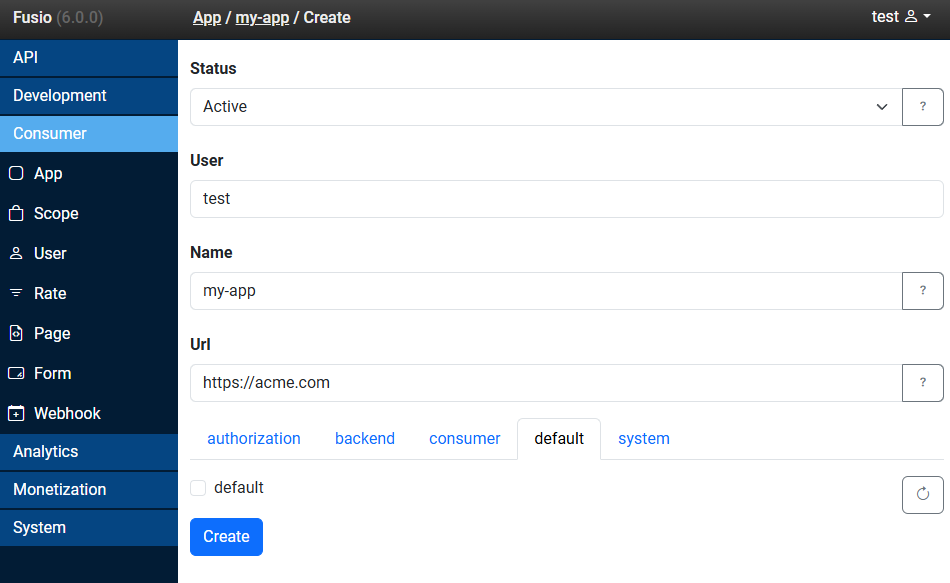
Status
The status of the app.
User
The user which is assigned to the app. If the app key/secret is used to obtain an access token the app can act on behalf this selected user.
Name
The name of the app.
Url
The url of the app.
Scopes
The scopes which are assigned to this app.
Client credentials
Request
POST /authorization/token
Authorization: Basic czZCaGRSa3F0MzpnWDFmQmF0M2JW
Content-Type: application/x-www-form-urlencoded

grant_type=client_credentials
For a Basic authorization header you need to provide the [app key] + ":" + [app secret] as a base64 encoded string. It is
also possible to provide your username and password but in general it is recommended to use the app key and secret since
the app access can always be revoked later on.
Response
{
  "access_token": "",
  "token_type": "bearer",
  "expires_in": 3600,
  "refresh_token": ""
}
Refresh token
Most token responses always include a refresh token. You can use this refresh token to extend an access token before it expires.
Request
POST /authorization/token
Authorization: Basic czZCaGRSa3F0MzpnWDFmQmF0M2JW
Content-Type: application/x-www-form-urlencoded

grant_type=refresh_token&refresh_token=[refresh_token]
Like at the client credentials call the Basic header must contain the base64 encode app key and secret.
Response
{
  "access_token": "",
  "token_type": "bearer",
  "expires_in": 3600,
  "refresh_token": ""
}
As response you will get the refreshed access token.